How Peer2Profit and Astroproxy Turn Your Bandwidth Into Someone Else's Product

We joined a bandwidth-sharing network to see what actually happens to your IP address. The answer should worry every security team that assumes “not malware” means “not a risk.”
Key Findings
- Residential proxies are almost invisible to security teams, yet they can expose organizations’ valuable internal resources to anyone with a proxy subscription.
- PEER2PROFIT directly feeds ASTROPROXY. Silent Push confirmed an active, operational relationship between the two: PEER2PROFIT recruits everyday users and pays them for bandwidth, while ASTROPROXY resells that bandwidth commercially, at up to 27 times what the user was paid.
- The scale is larger than a niche side-hustle app would suggest. Over a 72-hour enumeration window, we identified 117,224 unique IPs across ASTROPROXY’s residential, mobile, and datacenter pools, with the residential pool alone adding over 1,000 new IPs every hour.
- These apps are not malware. PEER2PROFIT installs through official channels with full user consent, which means standard antivirus tools and threat intelligence feeds don’t flag it, and any employee can install it on a corporate device without triggering a single alert.
- A DNS record was enough to reach internal networks. ASTROPROXY blocks direct requests to internal IP ranges, but our team determined the filter could be bypassed with nothing more than a domain name resolving to an internal IP address, thereby allowing access to a residential router’s admin interface through an enrolled proxy node. (This was responsibly disclosed before publication; the provider did not remediate).
Table of contents
- We joined a bandwidth-sharing network to see what actually happens to your IP address. The answer should worry every security team that assumes “not malware” means “not a risk.”
- Key Findings
- Executive Summary
- What Are Residential Proxies and Why Do They Matter?
- How Residential Proxy Networks Are Built
- The PEER2PROFIT Bandwidth Sharing App
- Technical Analysis
- ASTROPROXY
- Confirming the Relationship
- ASTROPROXY Enumeration
- Scale and Rotation
- Geographic Distribution
- ASN Distribution
- The Risk
- Continuing to Track PEER2PROFIT/ASTROPROXY Proxy Networks
- Interested in Learning More?
- Appendix A: PEER2PROFIT Backconnect Server List
- Appendix B: PEER2PROFIT Samples
Executive Summary
Residential proxy networks are a rapidly growing market and an increasingly active area of interest for security researchers. During our investigation, we explored the full lifecycle of proxy networks: from recruitment and construction to monetization. We confirmed the relationship between PEER2PROFIT and ASTROPROXY by enrolling our own device and observing our IP address in the proxy pool.
The risks associated with proxy networks extend beyond what most organizations account for. Credential stuffing, ad fraud, and account takeover are well-documented. Less discussed is that the devices powering these networks may be sitting in corporate environments right now, enrolled by an employee looking to make a few extra dollars, almost invisible to security teams, and exposing internal resources to anyone with a proxy subscription.
Traditional IP reputation-based detection is inherently reactive and flags only infrastructure already observed engaging in malicious activity. Proxy nodes rotate too fast and originate from too many legitimate ASNs for reactive approaches to keep up.
Effective detection requires a proactive approach: enumerating these networks, mapping the infrastructure that coordinates them, and maintaining up-to-date, real-time signals indicating which IPs are acting as proxy nodes at any given moment.
We build Silent Push proxy and VPN datasets through active enumeration of these networks. Combined with our Traffic Origin module, which links IP addresses to their true origin, we give security teams the context they need to make accurate, real-time decisions about the traffic hitting their platforms.
Our research findings are demonstrated throughout this blog.
What Are Residential Proxies and Why Do They Matter?
To understand how one of these proxy networks was built, we did what any curious researcher would do: we joined one. We became a proxy node in the PEER2PROFIT network, a bandwidth-sharing program that pays users for their internet connection, and then tracked to see what would happen to our IP address.
Our goal was more than to expose one bandwidth-sharing program and the related proxy service that monetizes it. We wanted to explore the inner workings of residential proxies and study the broader pattern: these bandwidth-sharing programs are easy to install, their infrastructure isn’t flagged, and yet they pose a real risk to organizations, since any employee can run them. In doing so, they hand their organization’s IP space to a proxy network, potentially causing reputational damage and even exposing internal corporate assets to the proxy network.
Datacenter vs. Mobile vs. Residential Proxies
Not all proxies are equal. Datacenter proxies use IP addresses specifically allocated to commercial servers. They are easy to provision, inexpensive to operate, and straightforward to block since they are static.
Mobile proxies can be sourced from real user devices or SIM farms. In these, traffic exits through carrier-grade NAT or mobile gateways, often sharing IP addresses across many legitimate users, making blocking ineffective.
Residential proxies are different. They are the hardest to deal with and thus the most attractive type of proxies to threat actors. The IP addresses belong to real users, assigned by their ISPs or carriers, and the devices can be literally everywhere: homes, offices, hospitals, universities, libraries, the local coffee shop, and more. From the perspective of a server receiving that traffic or a security product inspecting it, proxy traffic is indistinguishable from that of an ordinary user, employee, business partner, or customer browsing the internet.
Residential Proxies: The Good and The Bad
Residential proxies can serve both legitimate and malicious purposes.
Legitimate businesses might use residential proxies to, for example, test how their services appear across different geographies and verify ad placements.
We have found threat actors abusing residential proxy networks for large-scale credential stuffing operations, malspam campaigns, financial and banking fraud, geo-restriction bypass, and rate-limit evasion. Ad fraud networks that emulate legitimate human traffic to generate fake impressions and clicks, account takeover campaigns, coupon abuse, sneaker botting, and inventory scalping all rely on the same thing: traffic routed through residential proxies that appears to come from a real user.
The dual-use nature of residential proxy networks makes it difficult to block residential proxy traffic without significant collateral damage to legitimate users. However, this is only one part of the problem. The second is how fast these networks change: a given IP can be a clean residential connection one hour and an active proxy exit node the next, with no abuse history or any reputation signal to reflect that change.
Another use is footprint: a single device may move between different networks (home, corporate, and mobile) throughout the day, meaning the same node can appear across multiple ASNs and have different public IPs. Together, these properties make residential proxy infrastructure uniquely tough to track using traditional, reactive approaches such as reputation systems.
Active Proxy Network Enumeration + Traffic Origin
To address the residential proxy problem, we focused on actively enumerating proxy networks, mapping their infrastructure, and providing accurate signals on when and where proxy nodes are active.
Additionally, with Silent Push Traffic Origin, we can help organizations uncover the true origin of traffic routed through proxy networks, ultimately enabling stakeholders to make better decisions to protect their networks.
How Residential Proxy Networks Are Built
Talking about residential proxies without discussing how these networks are built is like talking about pollution without discussing the factories that produce it. The proxy IPs are only the tip of the iceberg; the infrastructure that recruits, coordinates, and monetizes proxies is where the real problem lies, and it’s not easily solvable.
SDKs and Bundled Libraries
This method is the stealthiest model and appears to be the most widespread. A legitimate-looking application, typically a free Virtual Private Network (VPN) app or mobile app, bundles a Software Development Kit (SDK) that, in the background, enrolls the device in a proxy network. Deep in the terms and conditions, users consent to the app using their bandwidth, but in practice, they don’t realize it is monetizing it. The app profits from users, proxy networks grow, and device owners have no clue what’s happening in the background.
Because the apps are often genuinely functional and distributed through official app stores, the model is difficult to address. The embedded proxy component is not malware per se but rather a monetization strategy.
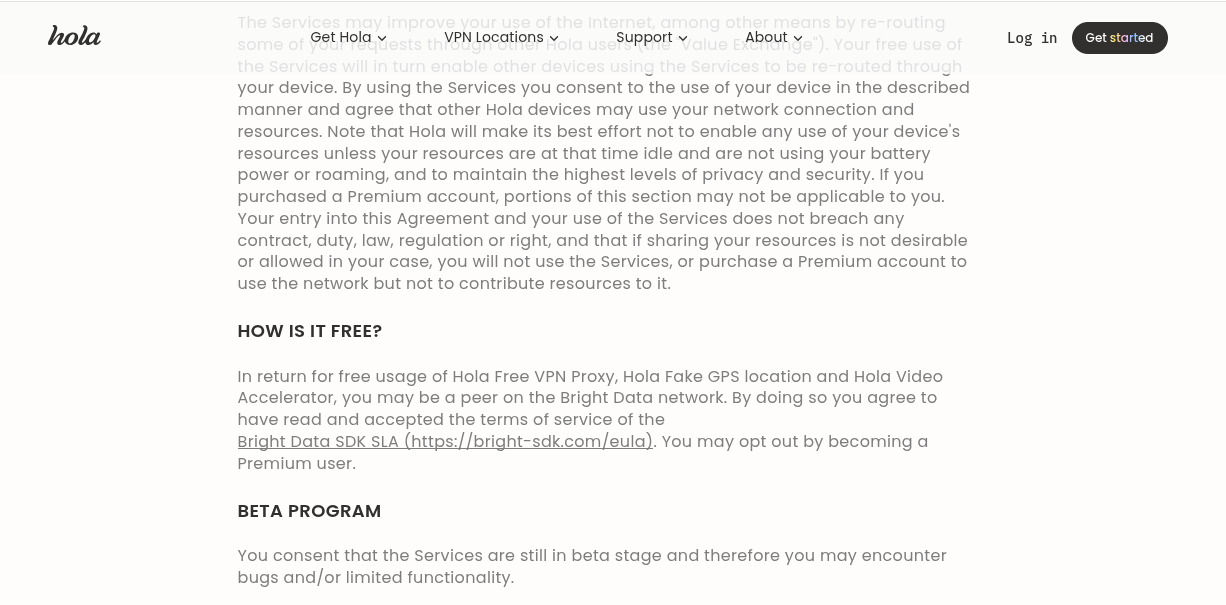
The example below shows the model in practice. The EULA (End-User License Agreement) of HOLAVPN explicitly states that free users may be enrolled as peers in the BRIGHTDATA network, the commercial proxy service that monetizes their bandwidth, with the option to opt out, but only by upgrading to a premium plan.
Passive Income Schemes – Bandwidth Sharing Programs
Instead of hiding and working silently like SDKs and relying on the terms and conditions of free apps that no one ever reads, bandwidth-sharing programs are open about what they will do with the bandwidth. The model is simple: the user installs the app, lets it run, shares bandwidth with the program, and earns money based on the amount of traffic proxied.
The transparency and voluntary nature of these apps are often used to frame this business model as legit and claim that all proxies are 100% ethically sourced. Since there’s money involved, these apps thrive in sourcing proxies and monetizing them through proxy services. As we will see later in this blog, the profit margins for these services are huge, as are the risks of running the apps.
Malware
Another way to build proxy networks is through malware. In this model, infected devices are enrolled in proxy botnets without the end users’ consent. This model produces the least stable proxy nodes, as endpoint security tools often clean infected devices and the threat intelligence community burns the command-and-control (C2) infrastructure. However, with this method, malware operators don’t have to recruit users or pay for bandwidth.
Proxies sourced from malware botnets are often monetized through shady proxy services that, for the most part, are either expensive to acquire or less stable than more well-established proxy services that acquire proxies through a globally distributed SDK.
The PEER2PROFIT Bandwidth Sharing App
Overview
PEER2PROFIT is a bandwidth-sharing program that has been operating since at least 2021. It recruits users to share their internet connection in exchange for small payments based on the amount of traffic they let through their devices.
What began as a web-managed service that promised an average payment of $6.37/month and $76.38/year has since moved entirely to Telegram, where users can now register accounts, manage their devices, and track their earnings.
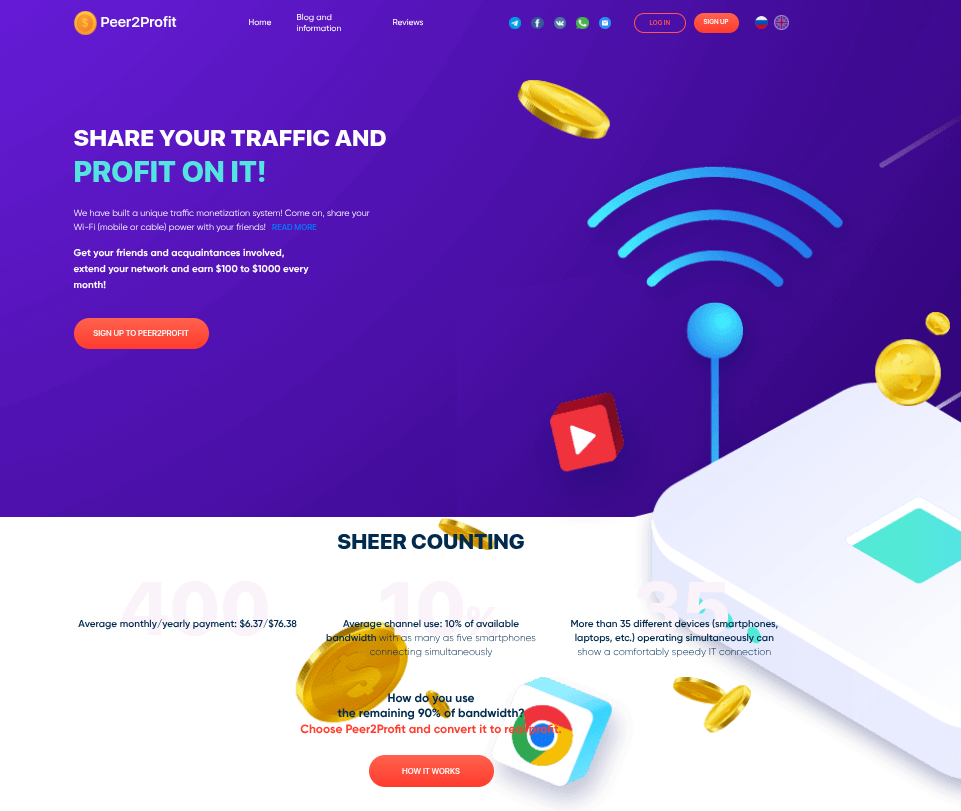
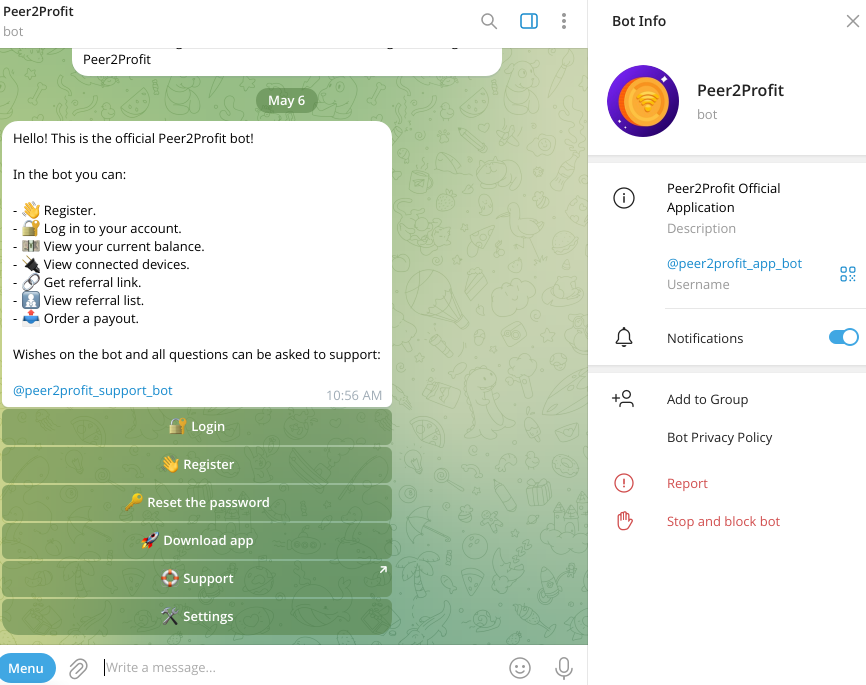
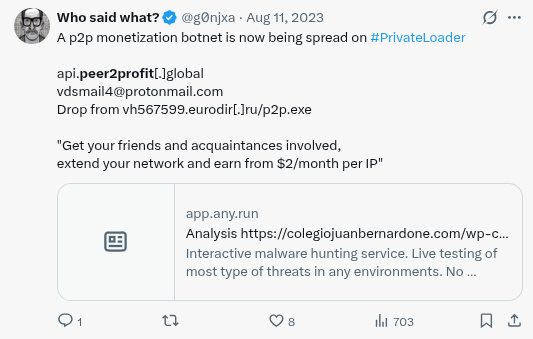
The bandwidth-sharing program supports multiple platforms: an Android Package Kit (APK), a macOS application, and, previously, Windows and Linux SDKs for developers looking to embed PEER2PROFIT’s bandwidth-sharing functionality into their own applications. This last option is no longer available, at least through official channels, likely due to increased abuse of campaigns to mass-install PEER2PROFIT via PPI (Pay-Per-Install) botnets such as PRIVATELOADER, as noted by the research community on X (formerly Twitter).
Payments are calculated per gigabyte (GB) of traffic routed through the devices, and the balance can be withdrawn directly via the Telegram bot using cryptocurrency.
Traffic rates vary by connection type: cellular traffic pays $0.35/GB, residential $0.28/GB, and hosting $0.10/GB. This tiered pricing reflects the market value of each IP type, with mobile and residential connections being treated as premium connections precisely because they are harder to block.
Getting Started
Onboarding in PEER2PROFIT is straightforward. Users interact with the Telegram bot, register an account, and download the appropriate client for their device.

From the same bot, users can monitor traffic, track their earnings, and issue cashouts.
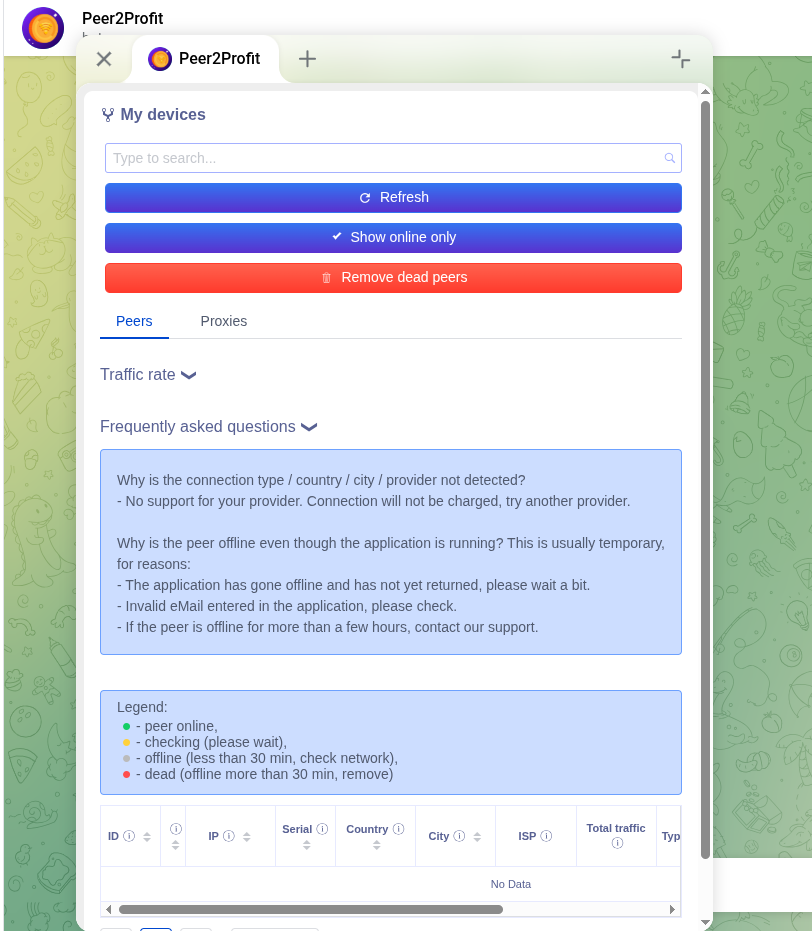
Overall, the process is designed to be extremely simple. The barrier to becoming a proxy node and earning some extra pennies is minimal.
Technical Analysis
This analysis was done in the following Windows SDK:
SDK SHA256: 0b10a1e48df2884a7a8a1ebf5aa903207955433c8ea00d7602c78be6e6c177ccSDK Filename: p2p-sdk.dll
Although the SDK is no longer officially supported, the underlying codebase and communication protocol remain valid. For that reason, this SDK file should accurately reflect the overall capabilities of all PEER2PROFIT apps.
Device Registration
The first action the SDK performs is to register the device with the proxy network and retrieve the configuration needed to connect to the main proxy network. The registration is done via an HTTP POST request to an API hosted at api[.]peer2profit[.]global, containing a JSON payload with basic device and client information like the following:
{ "token": "{API_KEY}", "installid": "P2P_WIN_{GUID}_{EMAIL}", "ver": "0.8", "agent": "1.07.02", }
If the API approves the device registration, it returns the address of the backconnect server the device should connect to to join the network and begin forwarding traffic.
{ "status": "SUCCESS", "data": { "node": "145.239.21.108", "port": 443, "peer_id": 687138140 } }
These backconnect servers are the core of the proxy network: they maintain persistent sessions with enrolled devices and forward traffic between the end client (whoever uses the proxy) and the device acting as the exit node.
Backconnect Session
The session between enrolled devices and the backconnect servers uses a custom binary protocol that wraps HTTP proxy traffic.
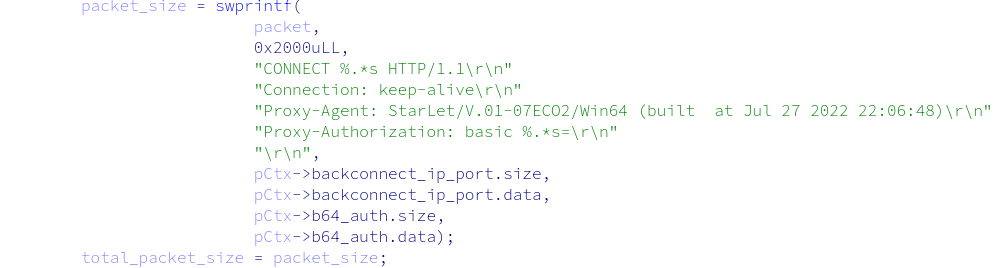
To establish a session, the SDK sends an authentication packet to the backconnect server. The payload begins as a standard HTTP data buffer, then encodes it by swapping the high and low nibbles of each byte; for example, 0x41 becomes 0x14. This encoded buffer is appended to a 7-byte header to form the final authentication packet.
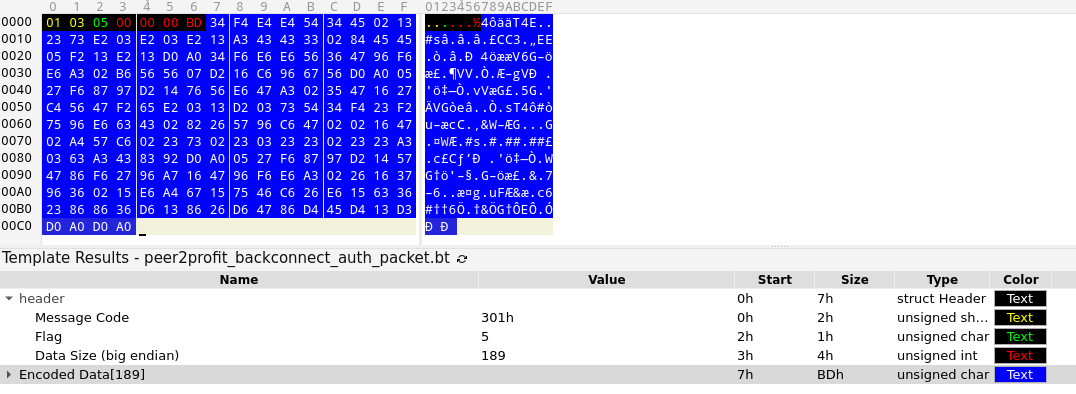
The backconnect server responds with 4 bytes representing the value 200 in big-endian format, confirming the session is established.
New Proxy Request
Once the session is active, the SDK waits for incoming proxy requests by attempting to read 8 bytes from the backconnect server that serve as a request ID.
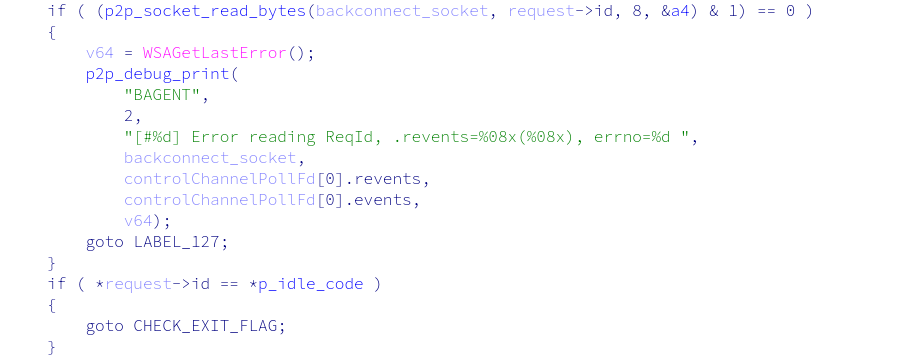
If this value differs from the hardcoded string $tar1et—indicating there is traffic waiting to be proxied—the SDK reads another 4 bytes representing the size of the incoming request data, then reads and decodes that data using the same nibble-swapping method described above.

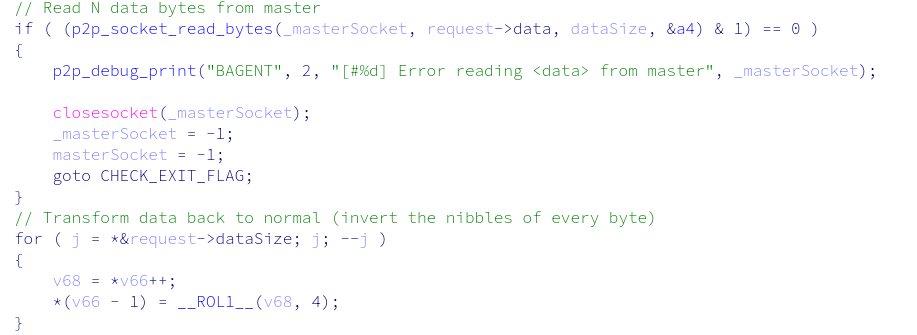
The decoded payload is an HTTP CONNECT request that identifies the target host the proxy client wants to reach.
CONNECT otx.alienvault.com:443 HTTP/1.1 Host: otx.alienvault.com:443 Proxy-Connection: Keep-Alive
To handle the incoming request, the SDK spawns a new thread to execute the request handler.
Request Handler
The request handler begins by extracting the host and port from the HTTP CONNECT data and opening a connection to the remote host.
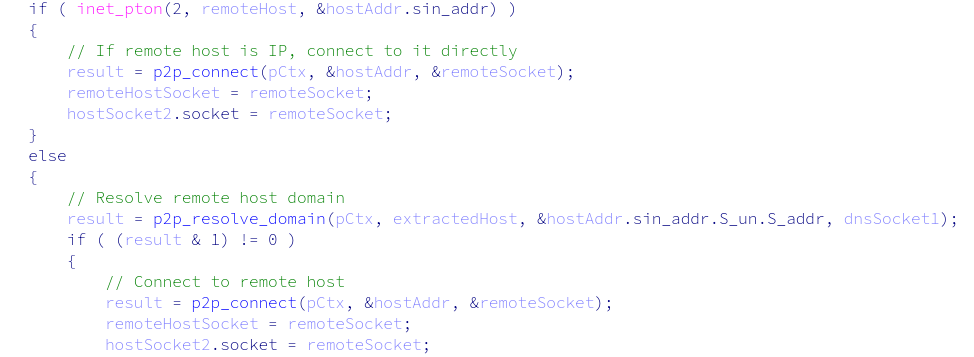
It then forwards the HTTP CONNECT request to the remote host and opens a new socket with the backconnect server. This second socket is dedicated to relaying the remaining proxy traffic for this specific request.
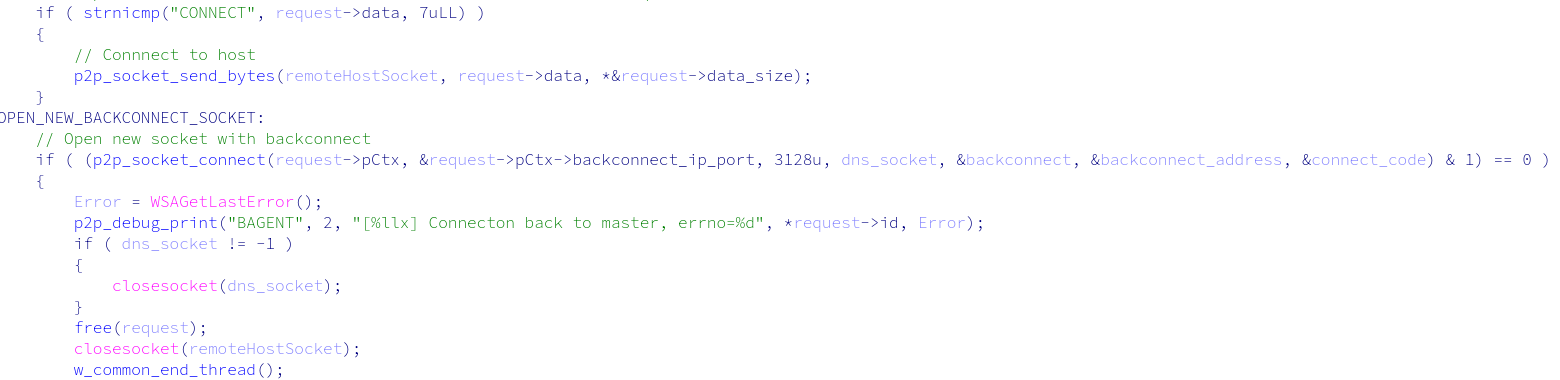
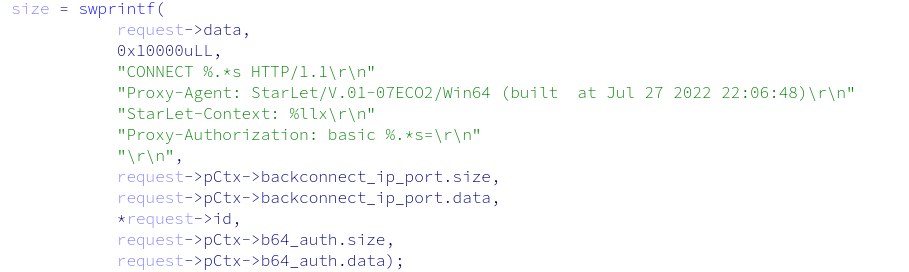
Because this is a new socket, the SDK must re-authenticate with the backconnect server. To do so, it sends the same authentication packet as before, with one addition: a StartLet-Context header containing the request ID. This header allows the backconnect server to associate this new socket with the request being handled.
After authentication is confirmed, the request handler enters a relay loop: reading data from the backconnect server, decoding it, and forwarding it to the remote host, and vice versa, encoding data from the remote host before returning it to the backconnect server. This loop continues until the transmission completes.
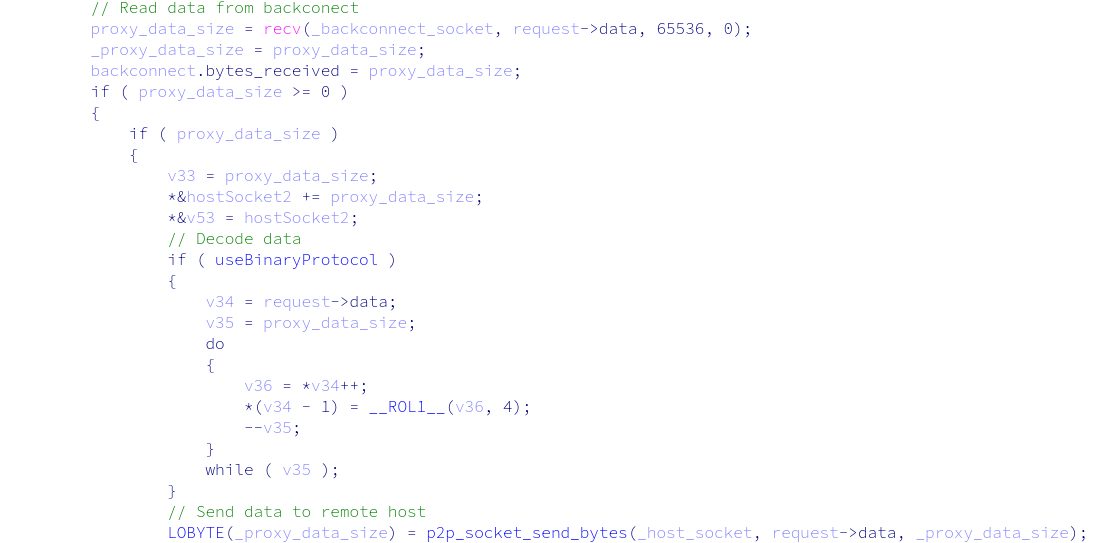
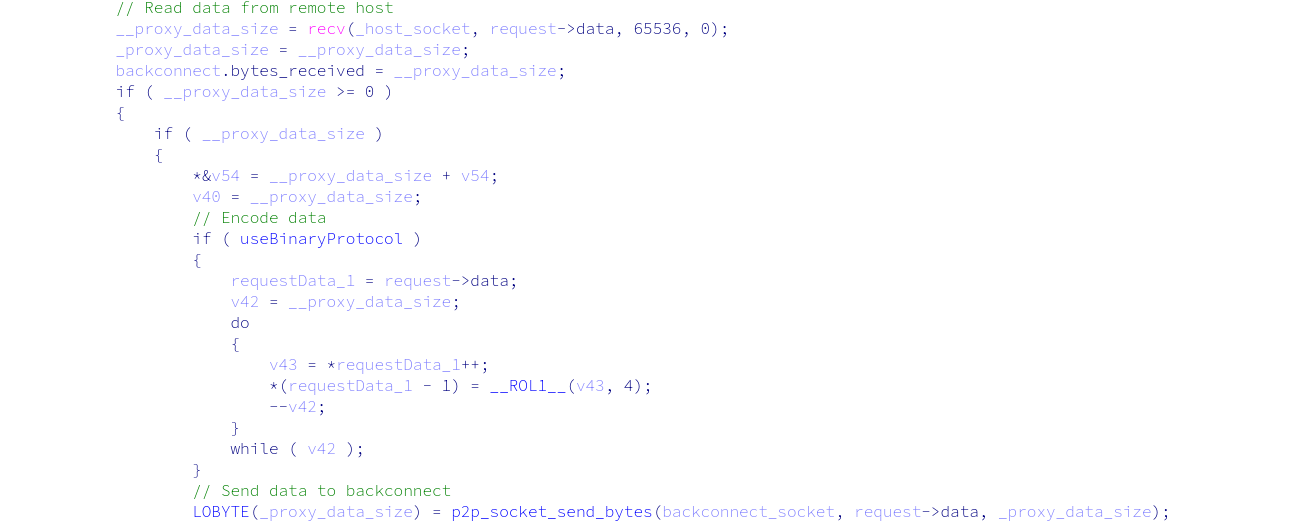
All data exchanged with the backconnect server is encoded using nibble inversion. Once transmission ends, the request handler exits and all sockets close.
Communications Protocol Summary
By reverse-engineering the PEER2PROFIT Windows SDK, we determined that we could reconstruct the full communications protocol and understand how the network infrastructure operates.
The diagram below illustrates the complete flow, from device registration through backconnect session establishment to the handling of individual incoming proxy requests.
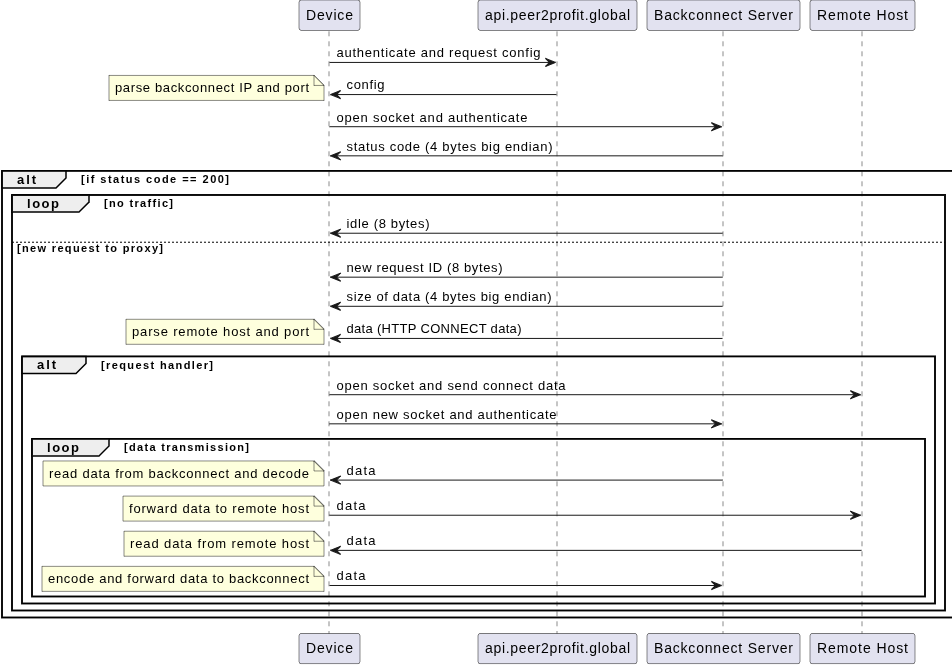
The protocol is simple but effective. Device registration and backconnect session management are handled via a lightweight HTTP-based API written in Go, and proxy traffic is relayed over a custom binary protocol that uses nibble inversion as a simple obfuscation layer. Each incoming proxy request is handled in its own thread, with a dedicated backconnect socket tied to the original request via the StartLet-Context header.
The overall architecture follows a classic backconnect proxy model: devices act as proxies, maintaining a persistent outbound connection to a backconnect server that relays incoming proxy requests.
Backconnect Infrastructure Tracking (Abbreviated)
With a clear understanding of the communication protocol, we enumerated the backconnect server infrastructure used by PEER2PROFIT, collecting the IP addresses and ports of the servers that coordinate proxy sessions. This allowed us to track which IPs were in active rotation, their hosting providers, and their geographic distribution. (The full list of backconnect infrastructure can be accessed in Appendix A at the end of this blog).
Summary of the 4 ASNs used to set up the backconnect servers:
| ASN | Provider | Country |
| AS16262 | DATACHEAP-LLC-AS | Russia |
| AS394380 | LEASEWEB-USA-DAL | United States |
| AS48716 | PSKZ-ALA | Kazakhstan |
| AS16276 | OVH | France |
The results are notable: the backconnect infrastructure is hosted across a small number of providers. It shows little variation over time, in contrast to the proxy nodes themselves, which are highly volatile. This asymmetry helps detection: while exit-node IPs rotate constantly, the core backconnect infrastructure is comparatively stable and trackable.
The infrastructure coordinating these networks is more stable than the proxy nodes themselves. While exit-node IPs rotate by the thousands hourly, the backconnect servers directing traffic are concentrated across just four hosting providers, a much more durable signal for detection than chasing individual IPs.
ASTROPROXY
While researching the historical PEER2PROFIT infrastructure, we identified three IP addresses that share an SSL certificate that links PEER2PROFIT and ASTROPROXY, a commercial proxy service.
VirusTotal findings for three IP addresses:
135.181.73[.]138, 162.19.83[.]163, 94.130.135[.]167

ASTROPROXY is a proxy service that offers residential, mobile, and datacenter proxies, claiming on its front page to have over 50 million ethically sourced proxies.
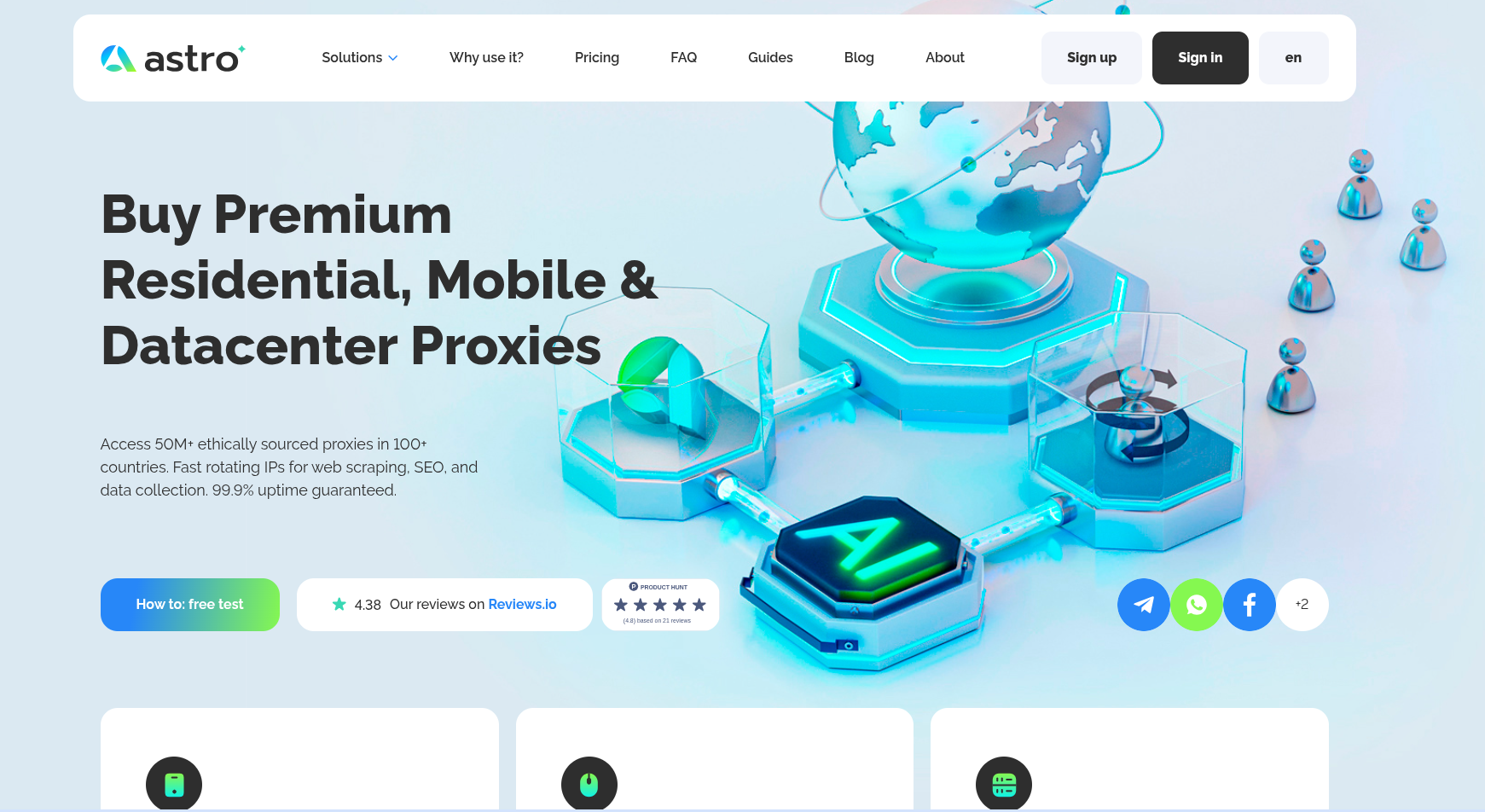
The ethical claim on the website uses language typically associated with proxies sourced through voluntary, consent-based recruitment models like PEER2PROFIT.
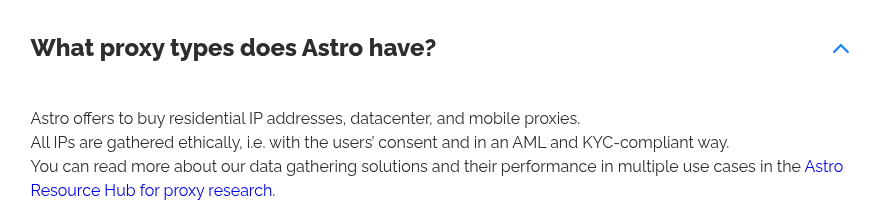
While a shared SSL certificate alone was not enough to confirm an active relationship between the two services, it did establish a historical connection and provided a solid lead for further investigation.
Confirming the Relationship
To determine if the relationship was still active, we took a direct approach: we joined a clean residential IP address as a node in the PEER2PROFIT network and monitored whether it surfaced in the ASTROPROXY residential proxy pool.
We ran the PEER2PROFIT Android app in a controlled lab environment with a clean residential IP address.
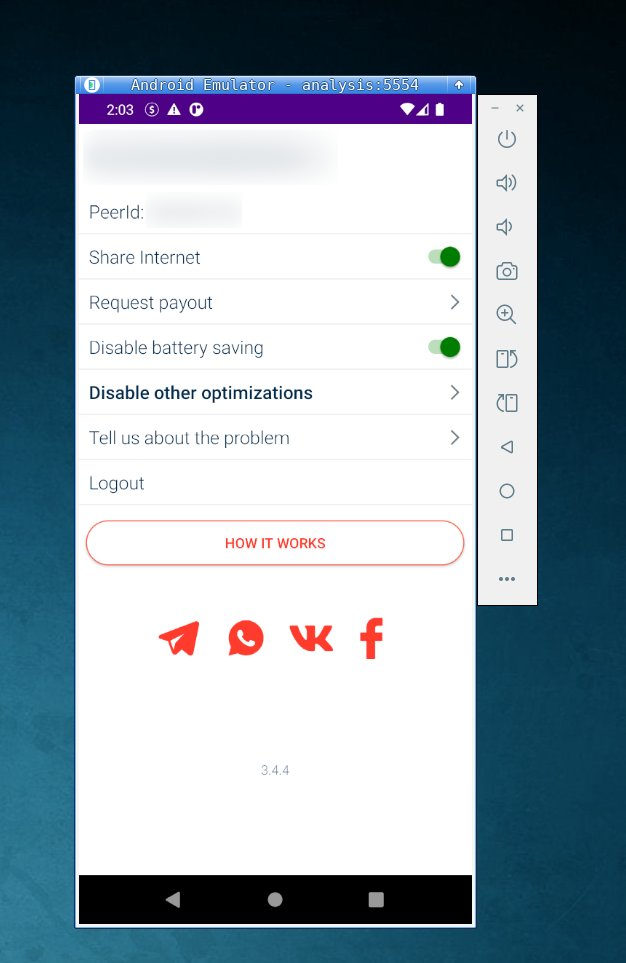
After about 10 minutes of running the PEER2PROFIT Android app, our test IP appeared in our proxy enumeration datasets, tagged as “ASTROPROXY.”
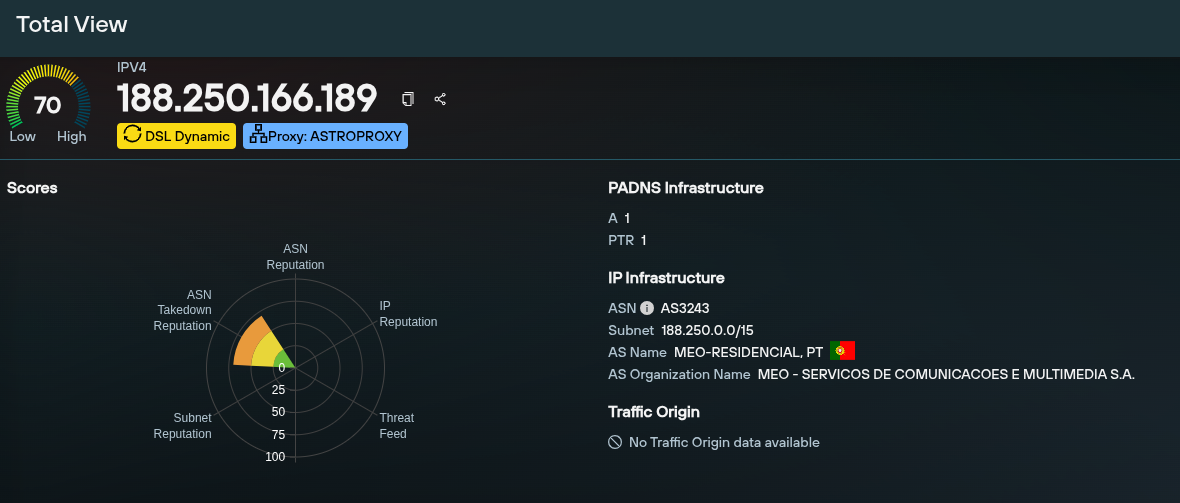
The experiment confirmed ASTROPROXY is actively monetizing PEER2PROFIT proxy nodes and that the two services are operationally connected: PEER2PROFIT recruits users and pays for their bandwidth while ASTROPROXY, a commercial proxy service, sells that bandwidth at a higher price.
The profit margin generated by this business model is significant across all traffic types. For residential traffic, PEER2PROFIT pays users $0.28/GB, while ASTROPROXY charges $7.60/GB. Mobile traffic pays users $0.35/GB and sells for $13.44/GB. Even datacenter traffic, the least valuable, pays $0.10/GB and sells for $3.95/GB. This means the operation retains over 97% of the value earned from selling bandwidth through ASTROPROXY.
ASTROPROXY Enumeration
To better understand the scale and geographic distribution of the PEER2PROFIT network as exposed through ASTROPROXY, we enumerated all proxy pools: residential, mobile, and datacenter.
Scale and Rotation
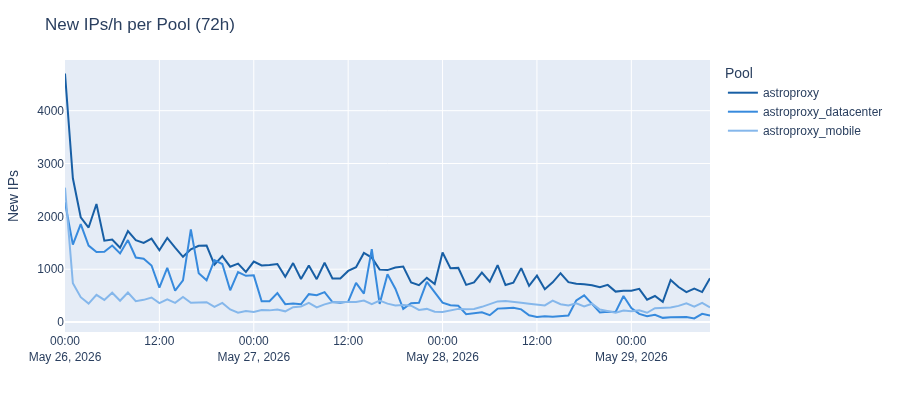
Over the 72-hour crawl period, we observed 117,224 unique IPs across all three pools: 60,247 in the residential pool, 38,762 in the datacenter pool, and 18,215 in the mobile pool.
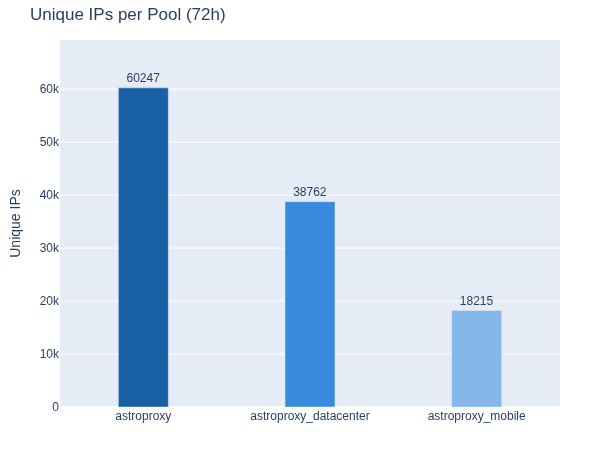
The network is highly dynamic. The residential pool averaged 1,071 new IPs per hour, the data center pool averaged 585, and the mobile pool averaged 353. This constant churn of new IPs makes reactive, reputation-based detection ineffective: by the time an IP is flagged for abuse, it has likely already been replaced in the proxy pool.
Geographic Distribution
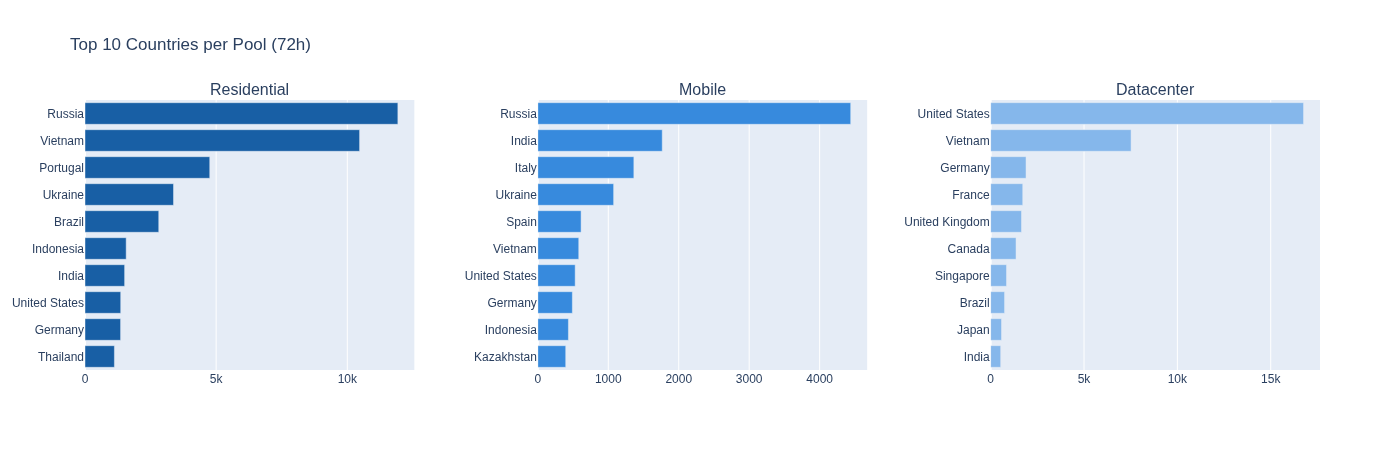
The residential pool is dominated by Russia and Vietnam, which together account for over 40% of all observed IPs. Portugal, Ukraine, and Brazil follow. The distribution spans every major region, reflecting the global reach of bandwidth-sharing programs.
The mobile pool follows a similar pattern. Russia and India lead, followed by Italy, Ukraine, and Spain, all served by legitimate national carriers.
The datacenter pool is more geographically concentrated, with the United States alone accounting for nearly 47% of observed IPs, followed by Vietnam and Germany.
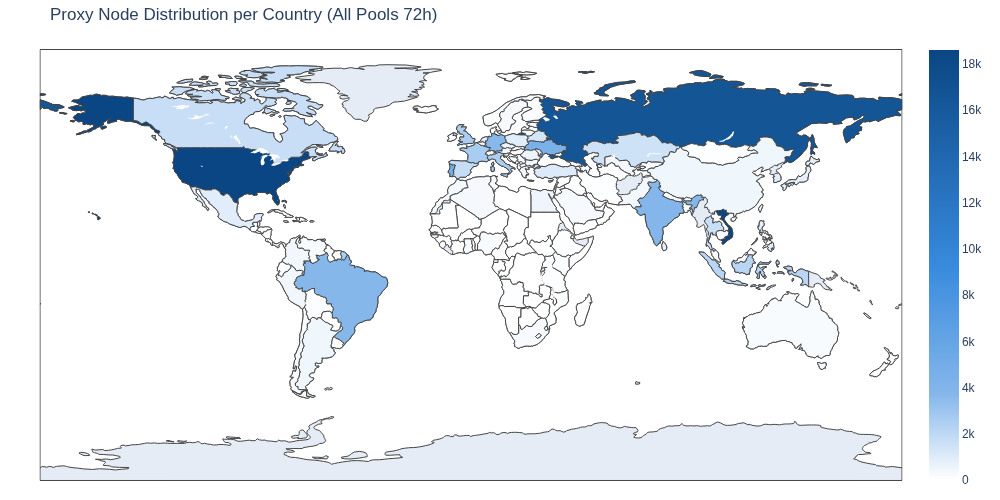
All three pools combined show a broad global presence.
ASN Distribution
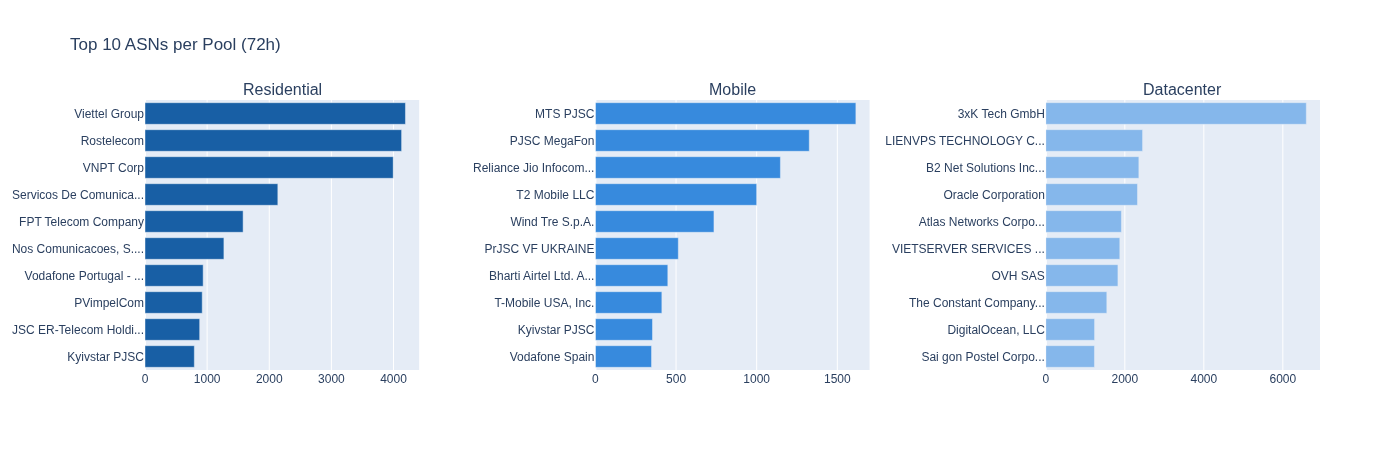
In the residential pool, the top ASNs are dominated by Russian and Vietnamese ISPs: Rostelecom, Viettel Group, and VNPT Corp, each contributing over 4,000 IPs. Two main Portuguese ISPs follow: MEO and NOS. These are large national ISPs with millions of subscribers, which illustrates why residential proxy traffic is indistinguishable from ordinary consumer internet usage.
The mobile pool is led by Russian carriers MTS PJSC and MegaFon, alongside Indian operators Reliance Jio and Bharti Airtel, and European carriers including Wind Tre and T-Mobile. Again, all legitimate carriers that operate nationally.
The datacenter pool presents a different picture. The top ASN, 3xK Tech GmbH, has 6,594 IPs, nearly three times that of the second-largest provider, LIENVPS Technology, at 2,449 IPs. This pool is dominated by hosting and cloud providers, whereas the residential and mobile pools are spread across big consumer ISPs and mobile carriers. The distinction is reflected in the pricing, with datacenter proxies being the cheapest because they blend far less convincingly with legitimate user traffic than residential or mobile nodes do.
The Risk
Bandwidth-sharing programs such as PEER2PROFIT are not malware; they are legitimate applications distributed through official channels that users knowingly install. This distinction has significant consequences for corporate security.
Any Employee Can Install One
There is no technical barrier to an employee installing a bandwidth-sharing client on a corporate device or on a personal device connected to a corporate network. Common antivirus solutions do not flag these programs, and the infrastructure they connect to- the backconnect servers and the registration APIs- are not listed as malicious in standard threat intelligence feeds or reputation systems. From the perspective of most security tooling, the traffic these apps generate looks benign.
A Corporate IP Becomes a Proxy Exit Node
Once installed, the device’s internet connection, and by extension, the organization’s IP space, becomes available as a proxy exit node in a commercial proxy service. Any traffic routed through that node will appear to originate from a corporate IP address.
This scenario has direct and serious implications, such as abuse traffic, credential stuffing attempts, or fraud associated with an organization’s IP, potentially triggering blocklists, compliance flags, or reputational damage with third-party services.
Access to Internal Networks
The risk extends beyond IP exposure. During our investigation, we found the ASTROPROXY proxy network allowed requests to reach internal network resources, not just the public internet.
We responsibly disclosed this finding before publication, and the provider was given significant time to investigate and remediate. With no meaningful remediation forthcoming, we are disclosing this publicly to raise awareness of the risk that a bandwidth-sharing program can pose to the networks it operates on.
As shown below, direct access to internal IP addresses is blocked.

But this rule/filter could be easily bypassed with a simple DNS entry resolving to internal IPs. To demonstrate this, we used a domain that resolved to the default internal IP used by MEO, Portugal’s largest ISP, for its residential router management interfaces.
Using a node enrolled in the PEER2PROFIT network and available via ASTROPROXY, we successfully reached those management interfaces and downloaded a PNG file from the router as proof of access.
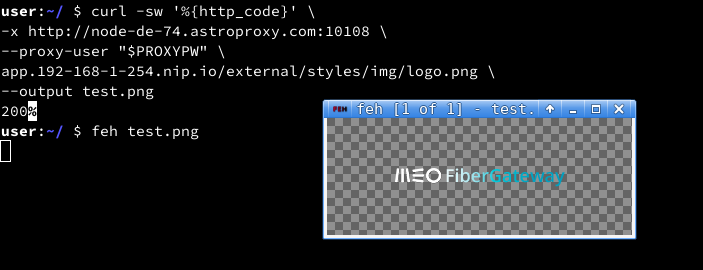
The success of this experiment means that a user running a bandwidth-sharing client is not only giving away the public IP address, but it is also potentially exposing every device on that network to anyone with access to the proxy service, including the router, NAS devices, smart home infrastructure, and any other internally accessible resource.
In a corporate environment where employees work remotely via corporate VPNs or connect personal devices to office networks, the implications are considerably more serious, as internal company assets could also be exposed.
This risk is amplified by the targeting capabilities offered by many proxy services, such as ASTROPROXY. Subscribers can filter proxy nodes by country, city, ASN, or connection type, enabling targeted selection.
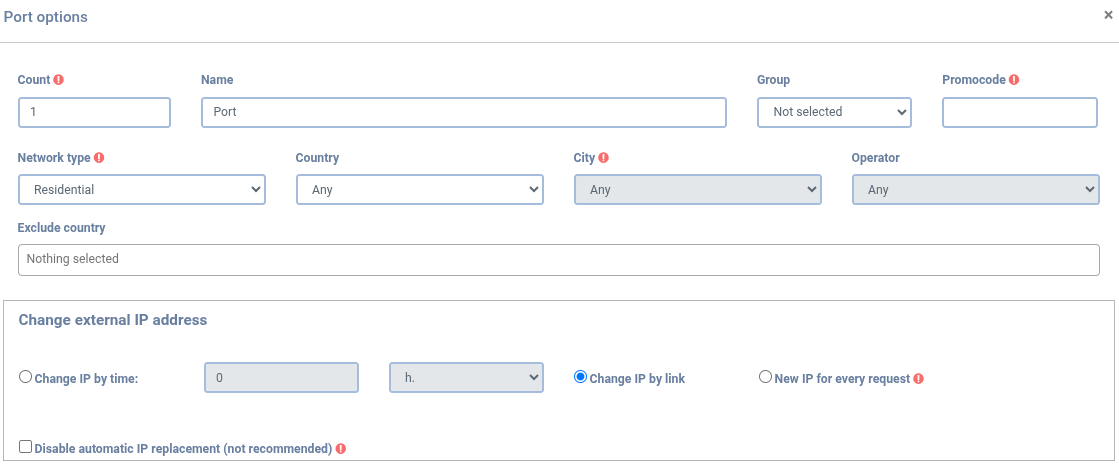
In the context of internal network access, this is significant! For example, a threat actor seeking to exploit router interfaces for a particular ISP could easily do so via a proxy service that provides access to the ISP’s internal network.
Probing internal company assets might also be possible by selecting proxy nodes that are geographically and topologically close to the target companies (same ASN, same country); only one proxy node within the network is needed.
Continuing to Track PEER2PROFIT/ASTROPROXY Proxy Networks
During our research, we examined the full lifecycle of proxy networks, reverse-engineered the PEER2PROFIT Windows SDK, reconstructed its communications protocol, and traced the path from a bandwidth-sharing program to a commercial proxy service. By enrolling our own device and observing our IP address in the proxy pool, we were able to confirm the relationship between PEER2PROFIT AND ASTROPROXY.
We enumerated all ASTROPROXY pools to collect enough data for our research, observing 117,224 unique IPs across three pools. In assessing the risk of running the PEER2PROFIT app, we demonstrated that the proxy network can reach internal network assets via nothing more than a DNS record pointing to an internal IP range.
While organizations may be aware of the documented risks typically associated with proxy networks, the lesser-known risks posed by devices in corporate environments, enrolled by an employee looking to make a few extra dollars, are almost invisible to security teams and expose internal resources to anyone with a proxy subscription.
Traditional IP reputation-based detection was not designed for this threat model and only reactively flags infrastructure that’s already been observed engaging in malicious activity. A proactive approach is the foundation of our work at Silent Push: be preemptive, not reactive. Our proxy and VPN datasets are built through active enumeration of these networks. When combined with our Traffic Origin module, which links IP addresses to their true origin, we provide defenders with the context needed to preemptively protect against traffic targeting their platforms.
We will continue to track PEER2PROFIT and ASTROPROXY, as well as other proxy networks, and report our findings as they progress. If you or your organization has information to share, we always welcome the opportunity to collaborate.
Interested in Learning More?
Start a conversation with one of our platform experts to learn how preemptive cyber defense can give your team more lead time on adversary infrastructure, before an attack is launched.
We also offer a free Community Edition so defenders can see how our platform integrates with their existing security stack.
Appendix A: PEER2PROFIT Backconnect Server List
The table below lists the complete set of backconnect IPs identified during this research. Individual IPs in the list may rotate out of active use over time. The ASN concentration above is the more durable signal.
| IP | ASN | ASNAME |
| 45.10.174.44 | 16262 | DATACHEAP-LLC-AS, RU |
| 45.10.174.47 | 16262 | DATACHEAP-LLC-AS, RU |
| 45.10.174.48 | 16262 | DATACHEAP-LLC-AS, RU |
| 45.10.174.49 | 16262 | DATACHEAP-LLC-AS, RU |
| 45.10.174.50 | 16262 | DATACHEAP-LLC-AS, RU |
| 45.10.174.51 | 16262 | DATACHEAP-LLC-AS, RU |
| 45.10.174.53 | 16262 | DATACHEAP-LLC-AS, RU |
| 45.10.174.55 | 16262 | DATACHEAP-LLC-AS, RU |
| 45.10.174.56 | 16262 | DATACHEAP-LLC-AS, RU |
| 45.10.174.57 | 16262 | DATACHEAP-LLC-AS, RU |
| 172.241.25.105 | 394380 | LEASEWEB-USA-DAL, US |
| 172.241.25.106 | 394380 | LEASEWEB-USA-DAL, US |
| 172.241.25.107 | 394380 | LEASEWEB-USA-DAL, US |
| 137.74.6.101 | 16276 | OVH, FR |
| 137.74.7.212 | 16276 | OVH, FR |
| 139.99.64.101 | 16276 | OVH, FR |
| 139.99.64.102 | 16276 | OVH, FR |
| 139.99.64.113 | 16276 | OVH, FR |
| 139.99.64.99 | 16276 | OVH, FR |
| 145.239.16.66 | 16276 | OVH, FR |
| 147.135.199.160 | 16276 | OVH, FR |
| 147.135.199.185 | 16276 | OVH, FR |
| 147.135.199.186 | 16276 | OVH, FR |
| 51.79.133.114 | 16276 | OVH, FR |
| 51.89.238.177 | 16276 | OVH, FR |
| 51.89.238.184 | 16276 | OVH, FR |
| 54.38.210.140 | 16276 | OVH, FR |
| 54.38.210.145 | 16276 | OVH, FR |
| 54.38.210.150 | 16276 | OVH, FR |
| 185.35.223.163 | 48716 | PSKZ-ALA, KZ |
| 185.35.223.164 | 48716 | PSKZ-ALA, KZ |
| 185.35.223.165 | 48716 | PSKZ-ALA, KZ |
| 185.35.223.166 | 48716 | PSKZ-ALA, KZ |
Appendix B: PEER2PROFIT Samples
| Name | File Type | SHA256 |
| p2p-sdk[.]dll | DLL | 0b10a1e48df2884a7a8a1ebf5aa903207955433c8ea00d7602c78be6e6c177cc |
| p2pclient | ELF | eb8826bac873442045a6a05f1fa25b410ca18db6942053f6d146467c00d5338d |
| Peer2Profit-0.47[.]dmg | DMG | 8871d12a7bb7529ff6e90ad5a18c86e92a402a2d02d3283d1385bdb52ba2b0f2 |
| P2P_3.4.4_(53)-release[.]apk | APK | c85c7436fdb71cf52db6ef134b336d66c7dbd3738a7866f8b9992434d1208a4b |